> ## Documentation Index
> Fetch the complete documentation index at: https://docs.proxylane.dev/llms.txt
> Use this file to discover all available pages before exploring further.
# How to set up sticky SOCKS5 in AntiBrow
> Save a ProxyLane SOCKS5 connection, reuse it with an AntiBrow profile, and check the same exit IP after a restart.
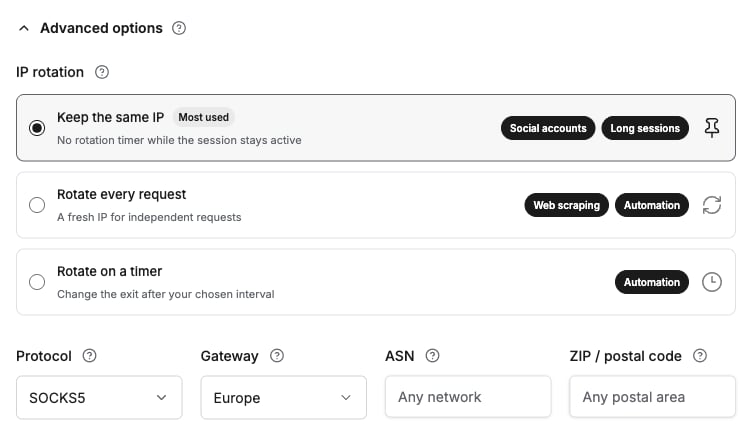
Select Keep the same IP and SOCKS5 in ProxyLane. Pass the saved connection URL to the AntiBrow software development kit (SDK), then reuse the same profile and URL after each restart.
A sticky connection requests the same exit IP, the address a website sees, while the residential session remains available. It does not reserve an address for weeks.
Jump to [proxy settings](/antibrow#save-the-proxylane-connection), [SDK setup](/antibrow#install-and-configure-the-checker), or the [restart check](/antibrow#check-and-restart-the-profile).
## Prepare the inputs
Use [Node.js 22.23.1](https://nodejs.org/en/download) on macOS, an AntiBrow API key, and an active [ProxyLane traffic balance](/traffic-and-payments). [Sign in to AntiBrow](https://antibrow.com/login) to access your dashboard and API keys.
The example installs AntiBrow SDK 2.32.0 and Playwright Core 1.63.0. It uses a US exit and a separate English-language test profile. Start without signing in to a target account.
Proxy requests consume traffic. The connection URL contains a proxy password, and browser profile files contain cookies. Keep both private. Enter secrets through hidden terminal input; revoke exposed credentials. SOCKS5 authentication does not encrypt the proxy connection, so use HTTPS destinations and an approved network.
## Save the ProxyLane connection
The selected rotation option and protocol must both match these settings.
Open [Residential proxies](https://proxylane.dev/dashboard/proxies) and select US under Country.
Expand Advanced options. Under IP rotation, select Keep the same IP.
Select SOCKS5 under Protocol. Choose a Gateway near the machine running AntiBrow. The gateway does not select the exit country.
Set Endpoints to `1`, then select Create proxy.
Under Format, choose socks5://username:password\@ip:port and select Copy.
Keep the connection in Saved lists. Reuse its entire URL, including the part of the username that identifies the session. Creating another proxy can create another session.
The [connection formats](/connection-settings#where-each-part-goes) explain host, port, proxy username, and proxy password. Copy the exported URL unchanged; do not substitute the ProxyLane account password or encode the URL again.
## Install and configure the checker
Start a Bash shell, create a private task directory, and install the pinned packages:
```bash theme={null}
bash
umask 077
mkdir antibrow-proxylane
cd antibrow-proxylane
npm init -y
npm install anti-detect-browser@2.32.0 playwright-core@1.63.0
```
Run these commands in the same shell. Paste the API key at the first prompt and the saved SOCKS5 URL at the second. Press Enter after each value. Input stays hidden and is not saved as a literal shell command.
```bash theme={null}
{
printf 'AntiBrow API key: '
read -r -s ANTIBROW_KEY
printf '\nProxyLane SOCKS5 URL: '
read -r -s PROXYLANE_PROXY_URL
printf '\n'
export ANTIBROW_KEY PROXYLANE_PROXY_URL
}
```
Save the following code as `antibrow-sticky.mjs` in this directory. Before the first run, choose an unused `PROFILE_NAME` and a new `PROFILE_DIR` in the configuration block. Keep those values and `BASELINE_FILE` unchanged for subsequent runs.
Pass `proxyUrl` each time the profile is opened, and reuse the same `profileName` and `profileDir` from the [AntiBrow profile options][sdk-options]. Use this SDK entry point for authenticated SOCKS5; a stock Chromium launch has different proxy authentication behavior.
Each run makes a browser request to [ipify](https://www.ipify.org/) for the exit IP in JSON. The service receives the request from the proxy exit IP.
```javascript antibrow-sticky.mjs theme={null}
import { createHash } from 'node:crypto';
import { readFile, writeFile } from 'node:fs/promises';
import { isIP } from 'node:net';
import { resolve } from 'node:path';
import { openProfile } from 'anti-detect-browser';
process.umask(0o077);
const KEY = process.env.ANTIBROW_KEY;
const PROXY_URL = process.env.PROXYLANE_PROXY_URL;
const PROFILE_NAME = 'proxylane-us-01';
const PROFILE_DIR = resolve('./antibrow-profiles/proxylane-us-01');
const LICENSE_SERVER = 'https://antibrow.com';
const BASELINE_FILE = './proxylane-us-01-baseline.json';
const EXPECTED_COUNTRY = 'US';
const EXPECTED_LANGUAGE = 'en-US';
const CHECK_URL = 'https://api.ipify.org?format=json';
const NAVIGATION_TIMEOUT_MS = 30_000;
const LAUNCH_TIMEOUT_MS = 120_000;
let session;
let stage = 'configuration';
try {
if (!KEY || !PROXY_URL) throw new Error('missing configuration');
const proxy = new URL(PROXY_URL);
if (proxy.protocol !== 'socks5:' || !proxy.hostname || !proxy.port ||
!proxy.username || !proxy.password || proxy.pathname || proxy.search || proxy.hash) {
throw new Error('invalid proxy URL');
}
const routeHash = createHash('sha256').update(PROXY_URL).digest('hex');
stage = 'saved route';
let baseline;
try {
baseline = JSON.parse(await readFile(BASELINE_FILE, 'utf8'));
} catch (error) {
if (error.code !== 'ENOENT') throw error;
}
if (baseline && (baseline.profile !== PROFILE_NAME || baseline.profileDir !== PROFILE_DIR || baseline.routeHash !== routeHash)) {
throw new Error('saved route changed');
}
stage = 'launch';
session = await openProfile({
key: KEY,
server: LICENSE_SERVER,
profileName: PROFILE_NAME,
profileDir: PROFILE_DIR,
proxyUrl: PROXY_URL,
restoreTabs: false,
focusWindow: false,
timeoutMs: LAUNCH_TIMEOUT_MS,
});
stage = 'exit geo';
if (!session.geo?.ip || session.geo.countryCode !== EXPECTED_COUNTRY) {
throw new Error('missing or unexpected exit geo');
}
const page = await session.context.newPage();
stage = 'browser IP';
const response = await page.goto(CHECK_URL, { waitUntil: 'domcontentloaded', timeout: NAVIGATION_TIMEOUT_MS });
if (!response?.ok()) throw new Error('IP endpoint failed');
const { ip } = JSON.parse(await page.locator('body').innerText());
if (!isIP(ip) || ip !== session.geo.ip) throw new Error('exit changed after geo lookup');
const identity = await page.evaluate(() => ({
timezone: Intl.DateTimeFormat().resolvedOptions().timeZone,
language: navigator.language,
}));
stage = 'profile identity';
if (identity.timezone !== session.geo.timezone || identity.language !== EXPECTED_LANGUAGE) {
throw new Error('profile identity mismatch');
}
const observation = { profile: PROFILE_NAME, profileDir: PROFILE_DIR, routeHash, ip, ...identity, checkedAt: new Date().toISOString() };
if (baseline) {
stage = 'continuity';
if (baseline.ip !== ip || baseline.timezone !== identity.timezone || baseline.language !== identity.language) {
throw new Error('continuity changed');
}
console.log('PASS: exit IP, timezone and language match the saved baseline');
} else {
await writeFile(BASELINE_FILE, JSON.stringify(observation, null, 2), { flag: 'wx', mode: 0o600 });
console.log('BASELINE SAVED: close and rerun with the same profile and proxy URL');
}
} catch {
console.error(`STOP at ${stage}: check the guide before opening an account`);
process.exitCode = 1;
} finally {
if (session) {
try {
await session.close();
} catch {
console.error('STOP at cleanup: close the remaining test browser manually');
process.exitCode = 1;
}
}
}
```
The [default desktop persona][sdk-persona] uses `en-US` and `en` for a fresh profile. An existing persona keeps its saved language. The checker reads the browser language and timezone instead of assuming country selection changed them. A non-English profile requires separate persona configuration before changing the expected country and language.
## Check and restart the profile
Run the checker from the same directory and shell:
```bash theme={null}
node antibrow-sticky.mjs
```
On the first successful run, the checker saves the observed IP, timezone, and language to the private baseline file and closes the browser. Expected output:
```text theme={null}
BASELINE SAVED: close and rerun with the same profile and proxy URL
```
Run the same command again. The checker reopens the profile and compares the browser connection with the saved values. Expected output when they match:
```text theme={null}
PASS: exit IP, timezone and language match the saved baseline
```
A changed proxy URL, profile name, or profile directory stops before launch. A changed IP, timezone, or language stops before account work. Preserve the baseline when investigating a mismatch; replacing it removes the comparison point.
Repeat at the restart intervals used by the workflow. Matching samples prove those checks, not uninterrupted or future IP continuity. For a fresh terminal, reopen the same directory and enter the same secrets again.
## Continue account work after verification
The checker closes its browser after each run. In an SDK integration, place authorized target navigation inside the existing-baseline success branch, after the comparison and before `finally` closes the session. Use the already checked `page`; reopening another browser requires another check.
Keep target navigation out of the first-run branch that creates the baseline. Then verify the target website's signed-in state. An IP check does not prove successful login or that a website accepts the connection.
## Troubleshoot a stopped check
The checker prints a stage label and suppresses raw exceptions that could contain proxy credentials.
Confirm both environment variables exist and the saved URL starts with `socks5://`. It must include the original username, password, host, and port. For `saved route`, restore the original connection, profile name, and profile directory; keep the baseline while investigating changes.
For `launch`, check the AntiBrow key, license access, browser kernel installation, and profile access. The `exit geo` stage checks the proxy IP and its country. Confirm proxy reachability, traffic balance, and US country selection. Stop if the SDK returns no exit identity or an unexpected country.
For `browser IP`, check SOCKS5 credentials and access to the IP endpoint. The browser IP must match the SDK geo lookup. For `profile identity`, check the saved persona language and timezone. For `continuity`, pause account work and investigate the changed value; do not silently accept a replacement IP.
Close a remaining test browser manually before reopening the same profile. The baseline and profile directory contain private state. The restrictive file defaults protect newly created files; they do not repair an existing directory's permissions.
[ProxyLane support](mailto:hello@proxylane.dev) can investigate a failed connection. Include the stage label and Node/SDK versions; omit passwords, API keys, and raw exception logs. [Connection troubleshooting](/troubleshooting) covers traffic and connection checks.
## Reference the SDK behavior
* [AntiBrow 2.32.0 profile options][sdk-options] define the license server, profile, and proxy fields.
* [Proxy geo at launch][sdk-geo] determines the launch timezone and public IP.
* [Default desktop persona][sdk-persona] defines the starting language of a fresh profile.
[sdk-options]: https://github.com/antibrow/antibrow/blob/ceb8316d2382027c088cb7ed2d541e8cff1b83de/js/src/engine/index.ts#L64-L151
[sdk-geo]: https://github.com/antibrow/antibrow/blob/ceb8316d2382027c088cb7ed2d541e8cff1b83de/js/src/engine/index.ts#L508-L543
[sdk-persona]: https://github.com/antibrow/antibrow/blob/ceb8316d2382027c088cb7ed2d541e8cff1b83de/js/src/engine/persona.ts#L219-L256